Delivery
Set how orders reach your drivers
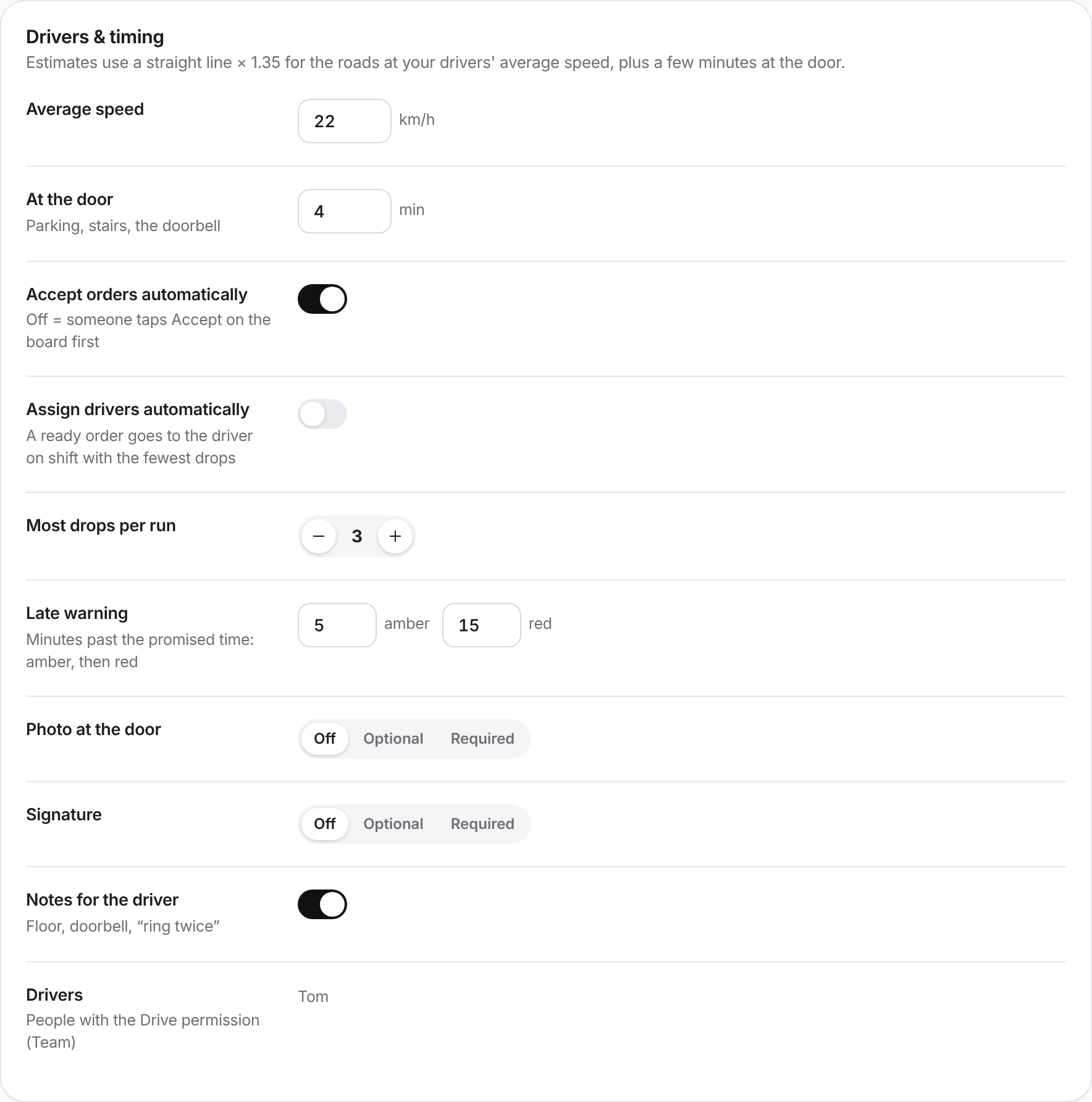
In Settings → Delivery → Drivers & timing, choose Accept orders automatically and Assign drivers automatically, and set Most drops per run.
Ce contenu n’est pas encore disponible dans votre langue.
-
Open Settings → Delivery and scroll to Drivers & timing.
-
Accept orders automatically is on. Switch it off if someone must tap Accept on the board first.
-
Switch Assign drivers automatically on to give each ready order to the driver on shift with the fewest drops.
-
Set Most drops per run: how many orders one driver takes at once.
How the arrival time is worked out
The distance in a straight line × 1.35 (for the roads), at your drivers’ Average speed, plus the minutes At the door.
Every setting
| Setting | Starts as |
|---|---|
| Average speed | 22 km/h |
| At the door | 4 min |
| Accept orders automatically | On |
| Assign drivers automatically | Off |
| Most drops per run | 3 |
| Late warning | 5 min amber, 15 min red |
| Photo at the door | Off (or Optional, Required) |
| Signature | Off (or Optional, Required) |
| Notes for the driver | On |