Menu
Translate your menu
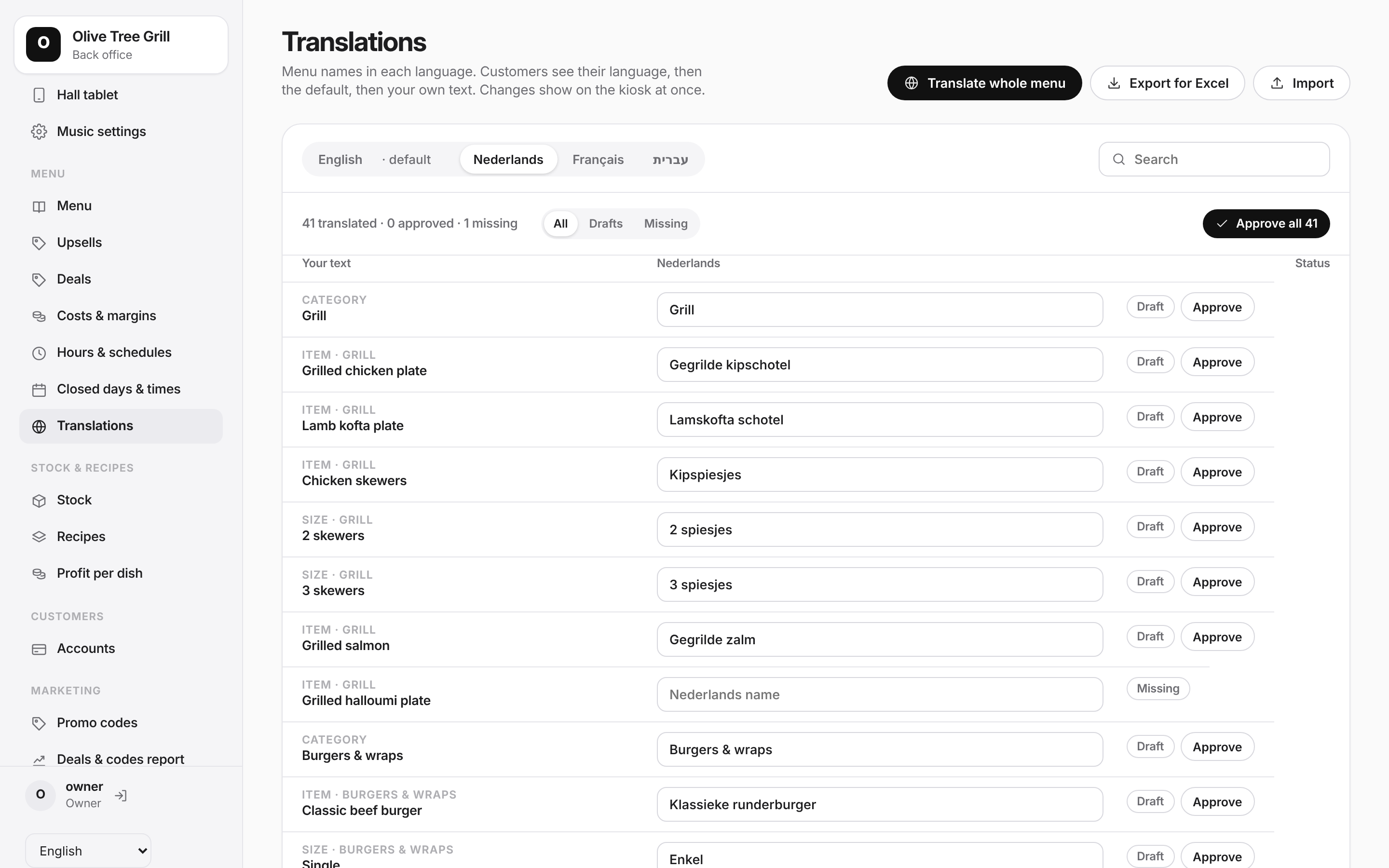
Open Translations, tap Translate whole menu, check each language, then tap Approve all.
תוכן זה אינו זמין עדיין בשפה שלך.
-
Open Translations (under Menu).
-
Tap Translate whole menu. Every name gets a draft translation.
-
Pick a language tab, like Nederlands. Read each line and fix anything that’s wrong.
-
Tap Approve on a line, or Approve all when the whole list is right.
-
Use Drafts and Missing to see what’s left.
Work in a spreadsheet
Tap Export for Excel, fill in the columns, then tap Import. Imported lines come in as drafts. Your menu itself never changes.
Status
| Status | Means |
|---|---|
| Draft | Not checked yet |
| Approved | Checked; this is what customers see |
| Missing | No translation yet: customers see the default language |
| Re-check | You changed your own text, so the translation may be out of date |