Delivery
Set delivery zones and fees
In Settings → Delivery → Where you deliver, add a zone (Radius, Drawn area or Postcodes), set its fee and minimum, then tap Save zones.
תוכן זה אינו זמין עדיין בשפה שלך.
-
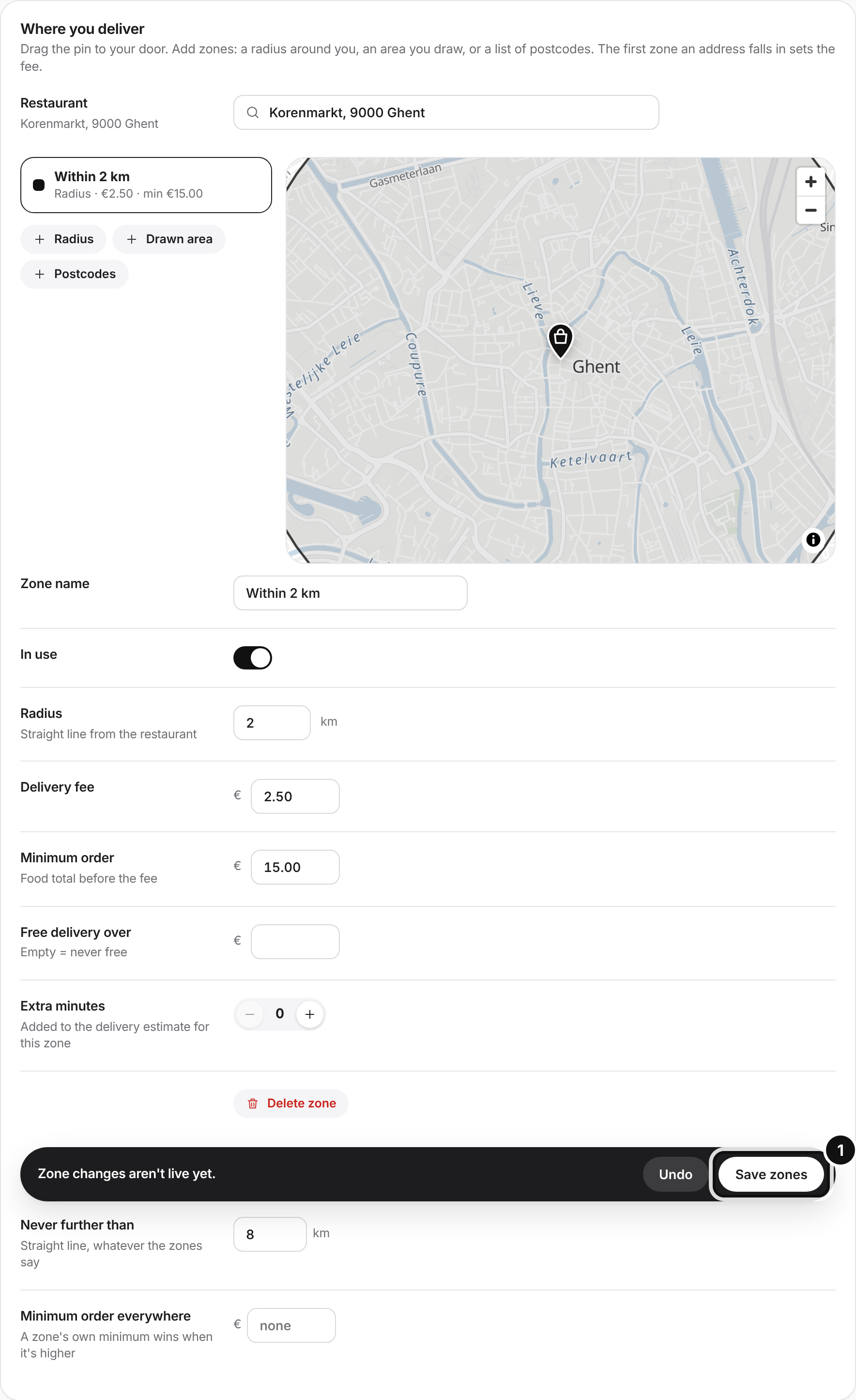
Open Settings → Delivery. Under Where you deliver, pick a kind of zone: Radius, Drawn area or Postcodes.
-
Give the zone a name. Set Delivery fee, Minimum order and, if you like, Free delivery over.
-
Need more time for far streets? Type minutes in Extra minutes.
-
Tap Save zones.
Which zone wins?
The first zone an address falls in sets the fee. Put small, close zones first.
Every setting
| Setting | Starts as |
|---|---|
| Radius | 2 km |
| Delivery fee | €2.50 |
| Minimum order (zone) | €15.00 |
| Free delivery over | Empty = never free |
| Extra minutes | 0 |
| Never further than | 8 km (straight line, whatever the zones say) |
| Minimum order everywhere | Empty. A zone’s own minimum wins when it’s higher |